

SI Cloud Control (SICC)
This guide will show how to use the ServingIntel Cloud Control platform. Run through the steps below to get started!
Overview
ServingIntel Cloud Control is a cloud-based platform that provides a complete solution for Sales Item Management, Loyalty Management and Team Member Management.
Pre-Requisites
Before using this guide, the following should be met first:
1) Any of the following roles should be granted to the user or fulfilled first before using ServingIntel Cloud Control:
a. Store Admin
b. Store User
2) Login credentials are given.
3) The following system applications and requirements are installed:
Managed by ServingIntel Cloud Control Team
This Topic Includes:
SICC Reporting
- Dashboard Reports
- Daily Performance Report
- Transaction Detail Report
- Transaction Report
- Customer Account Statements
- Gift Card Liability Report
- Item Sales Report
- Meals Sold Report
- Tip Handling Report (Tips Report)
- Time Clock Report
- Audit Report for Cancelled Sales, Voids, Comps, Discounts
- Resident Attendance Dashboard
- Resident Attendance Report
SICC Items Management
- Add Items
- Delete Items
- Update Item Images
- Update Web Item Names
- Update Items from SICC to eCommerce
- Enable/Disable Items from SICC to Hospitality Site
- Display “Available/Not Available” Items from SICC to Hospitality Site
- Update Item Availability
- Sort Items on the eCommerce Site from SICC
- Add Inscriptions for Items
- Update Item Attributes
- Set Up Item Scheduling
- Enable Meal Points
Using Group Edit Functions
Meal Plan Management
- Configuring Meal Plans
- Managing Meal Plans
- Configuring Meal Types
- Sorting Meal Types
- Meal Plan Points/Count Improvement
Site Settings Management
- Enable/Disable eCommerce
- Set Up eConnect Settings
- Set Up Order Times
- Add Item Groups
- Manage Meal Cycles
- Update Meal Cycles
- Create Meal Cycles
- Manage the Order Now Introductory Message
- Blocked Users
- Set Up Menu Names
- Add New Categories
- Delete Menu Names
- Manage eCommerce Sales Categories
- Set Up Business Hours
- Configure Settings
- Configure Devices
- Set Up a Virtual Restaurant
- Set Up Revenue Centers
- Set Up Service Profile Table Layouts
- Update Table Layouts
- Add Gift Cards
- Add Gift Card Types
- Check Security Level Settings in Discount Management and Employee Maintenance
- Enable a New Job Code
- Update POS Type on Service Profile
- Block User Sites Assignment
- Setting Up Payment Types
- Store ID Integration
- Merging User Logins & Employee
- Security Levels for 360
- 360 Devices and Printer Settings
- Delivery Zone Set Up
- Discount Management
- Add Order Type
- New Company Details
- Add eConnect Price
- Auto Gratuity – Additional Changes
- SI 360 Menu Controls
AI, BI, and SI Integration
Update People Information
#strategic
Managed by ServingIntel Cloud Control Team
Date Published: June 06, 2024
Date Updated: June 05, 2025
Version 2025.2.4
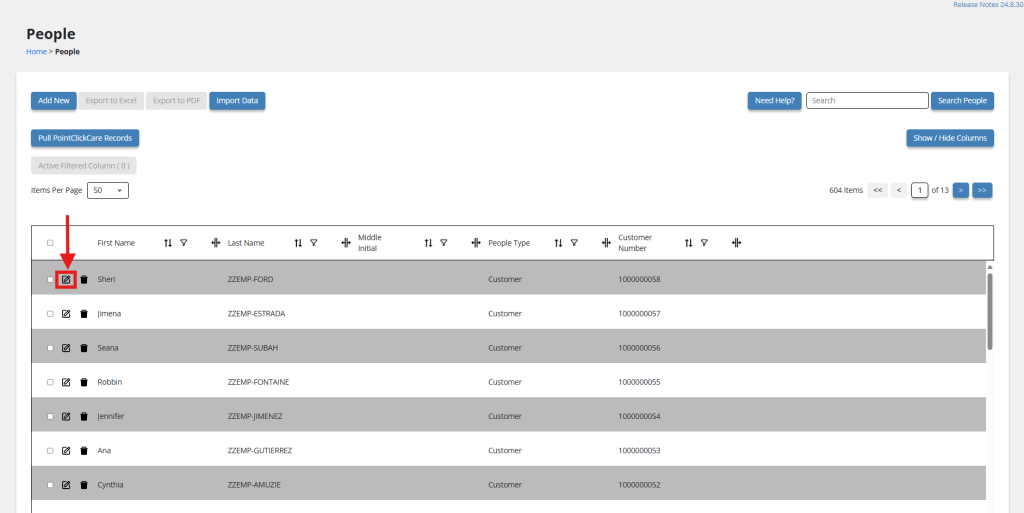
1. Go to the People menu, then select People Info.

2. In the People section, find the person’s information that needs updating and click the edit button next to their name.
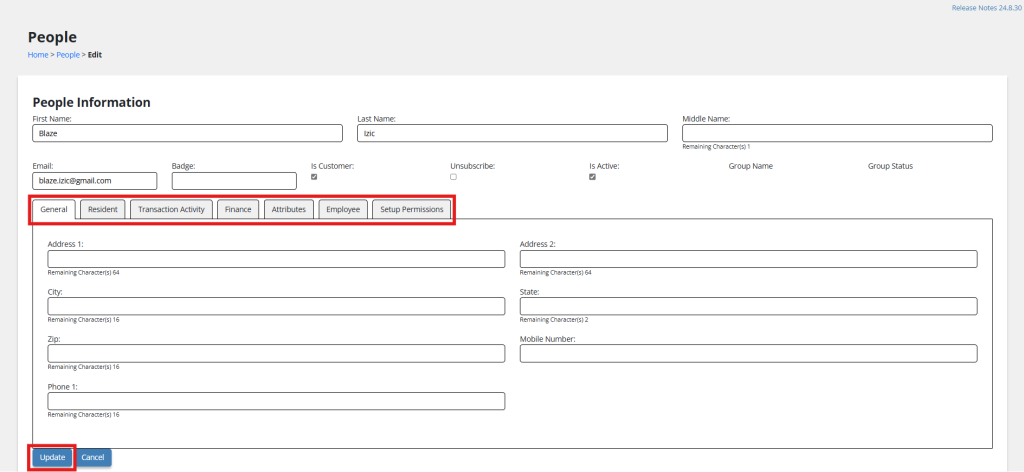
3. Edit the required field(s) on the People Information screen.
4. Save your changes by clicking the Update button.
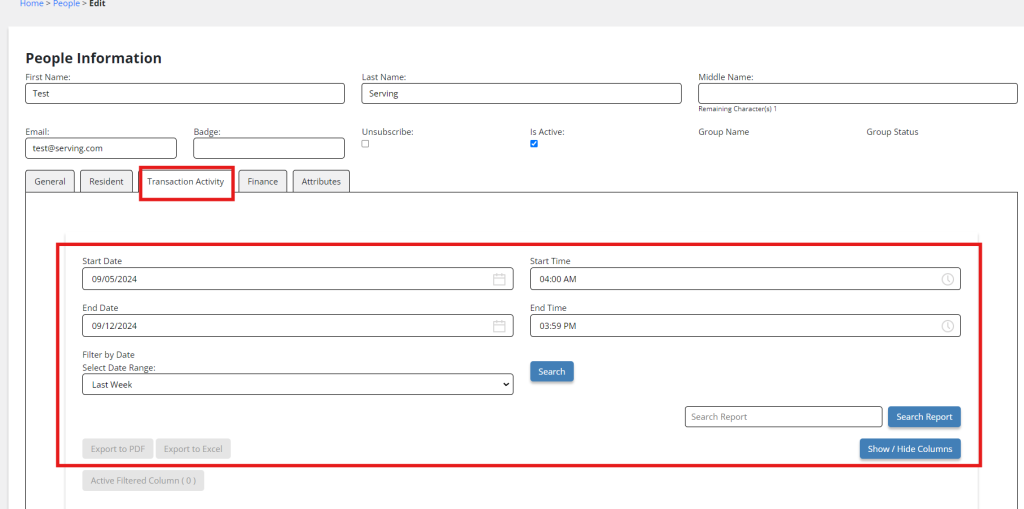
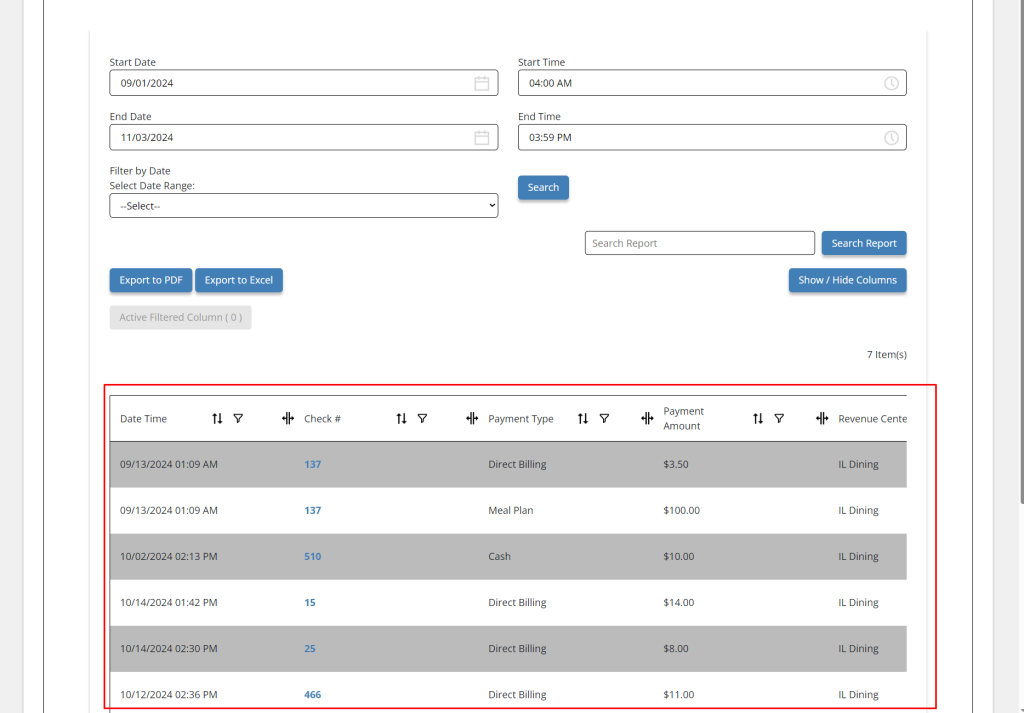
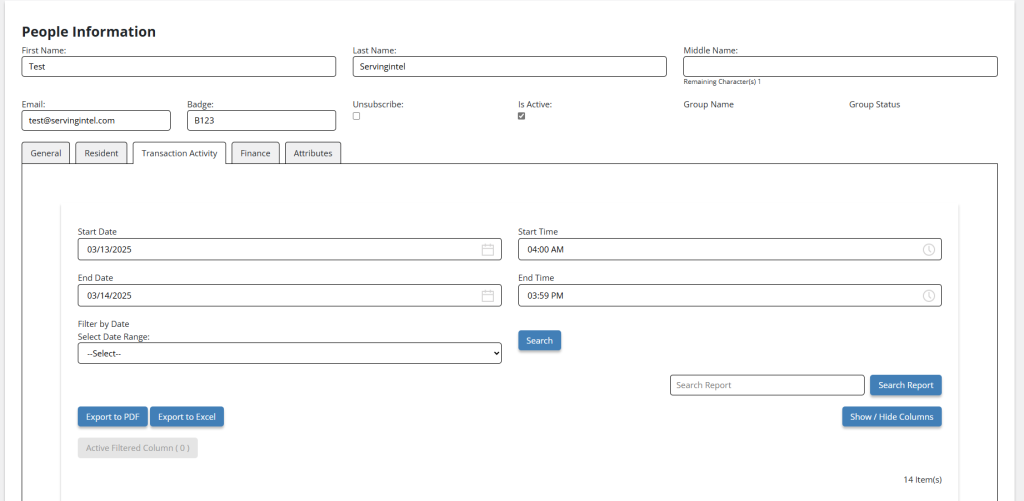
With version 24.11.5.1 update, you can now check recent transaction activities of a customer. This tab will display all transactions related to the customer profile, whether billable or not, in a grid view format.
Grid View Display:
The grid will show all transactions, regardless of type, with the following columns:
- End Date of Transaction: The final date when the transaction was completed.
- Check Number (with a viewable check): The unique check number associated with the payment, with an option to view the actual check.
- Payment Amount: The total amount paid for the transaction.
- Payment Type: The method of payment used (e.g., credit card, check, or cash).
- Revenue Center: The specific department or category where the payment was allocated.
Filter Options:
At the top of the report, include preset filters for quick access:
- Last Week
- Last Month
Additionally, allow a custom date filter similar to the grid view.
Export and Print Options:
- Provide the ability to export transaction data to different formats, such as Excel or PDF, with an option to print the report directly.
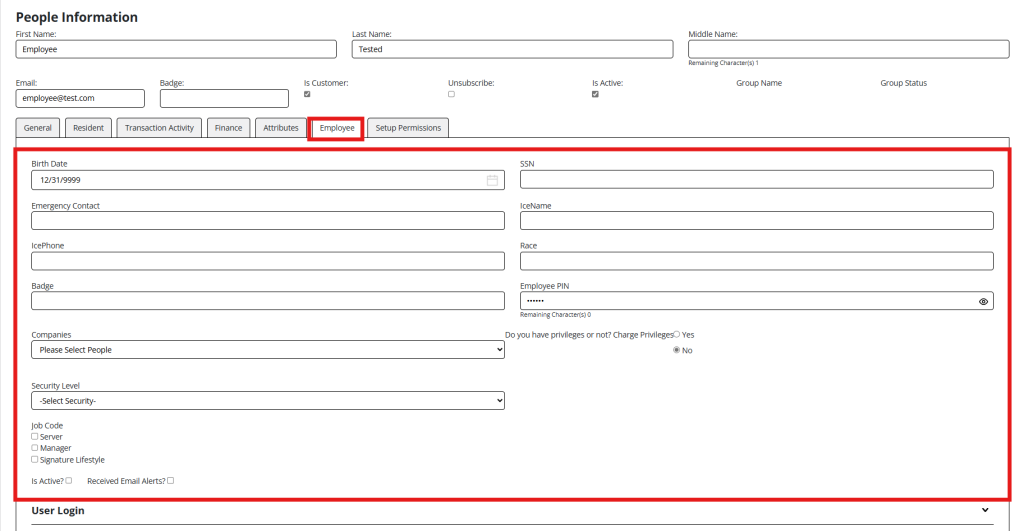
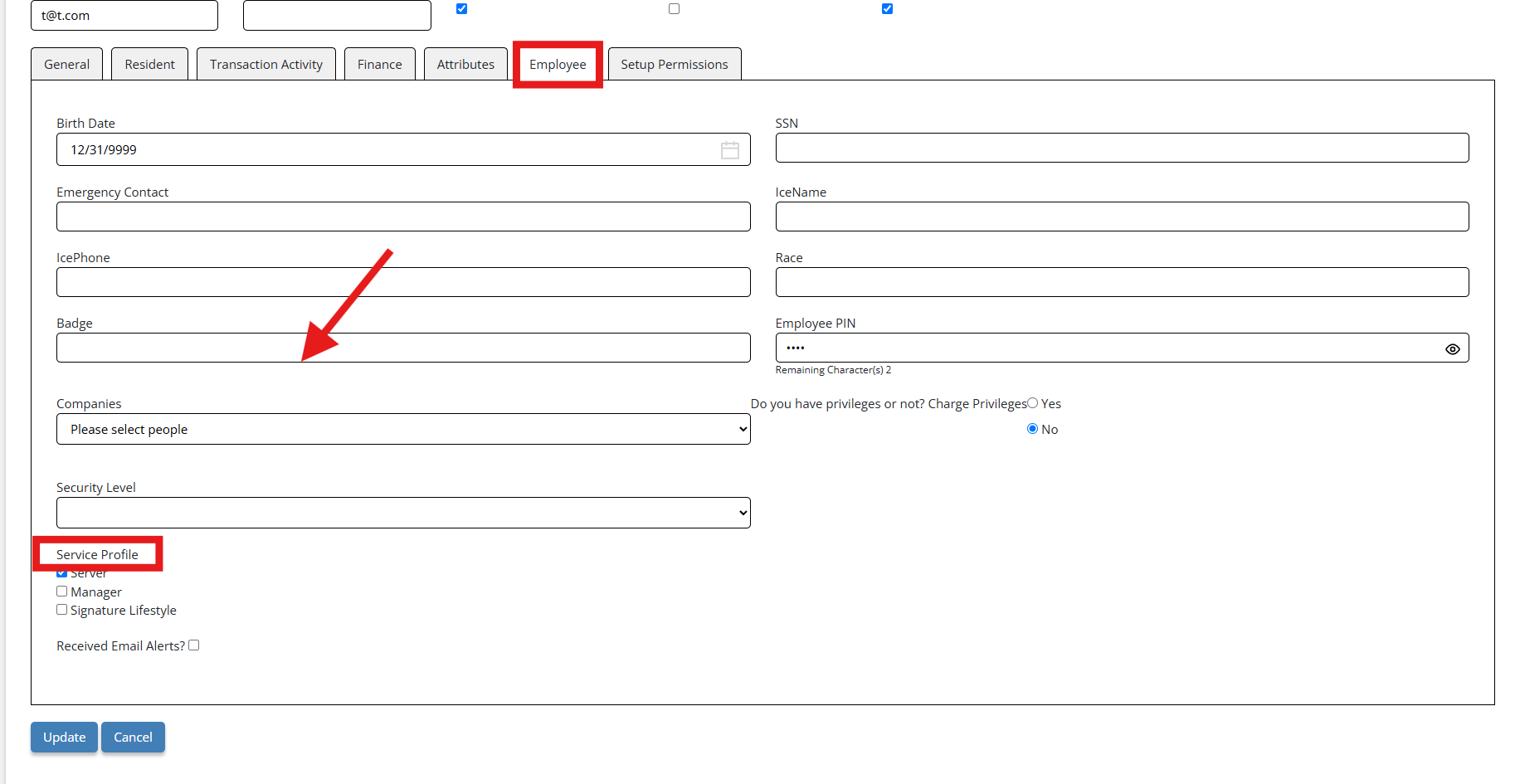
New Features: Employee and Setup Permissions
We’ve introduced two features to enhance employee management and system customization.
Employee Management
Streamline staff management with the ability to customize employee profiles. Some key features include:
- Assigning unique job codes.
- Defining security levels for operational access.
- Creating and managing employee PINs for secure login.
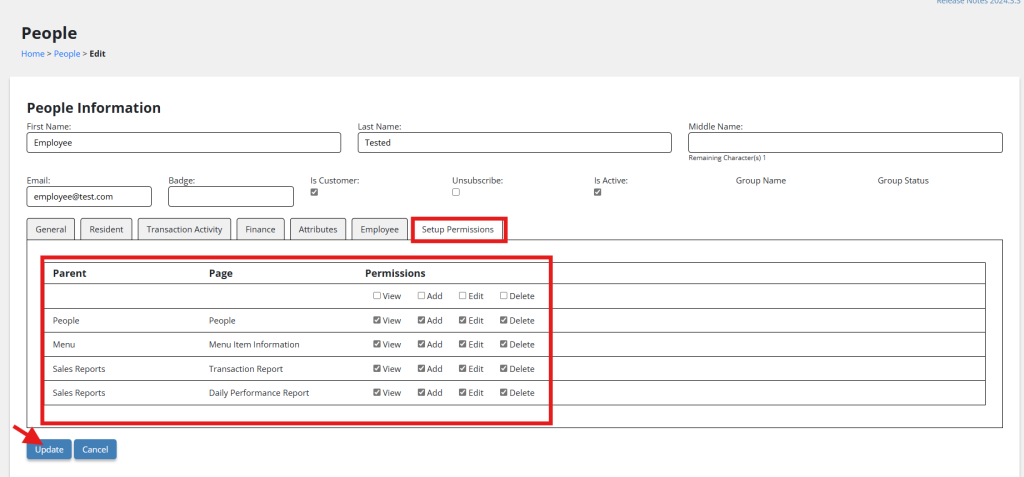
Setup Permissions
Take full control of system configurations. Customize access to settings and configurations to maintain smooth and secure operations.
New Feature: Credit Limit
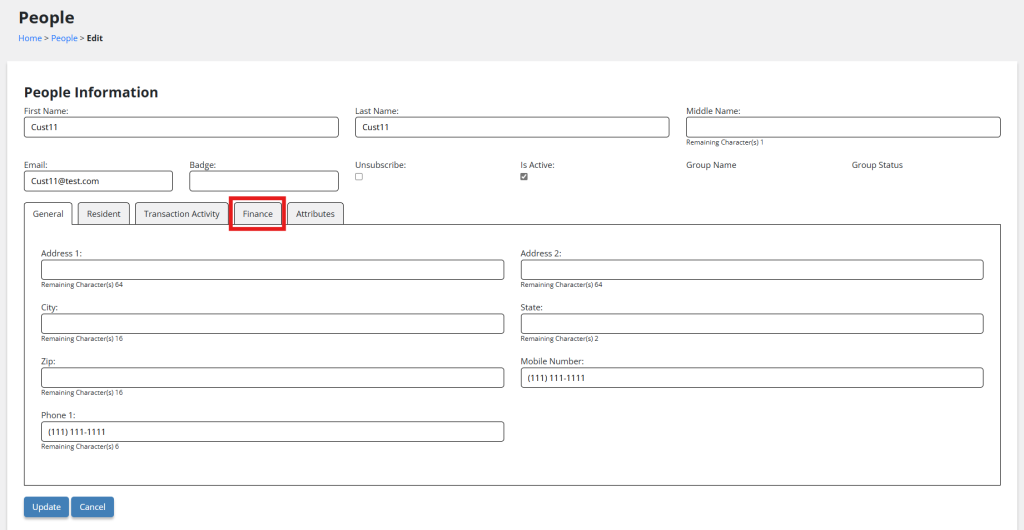
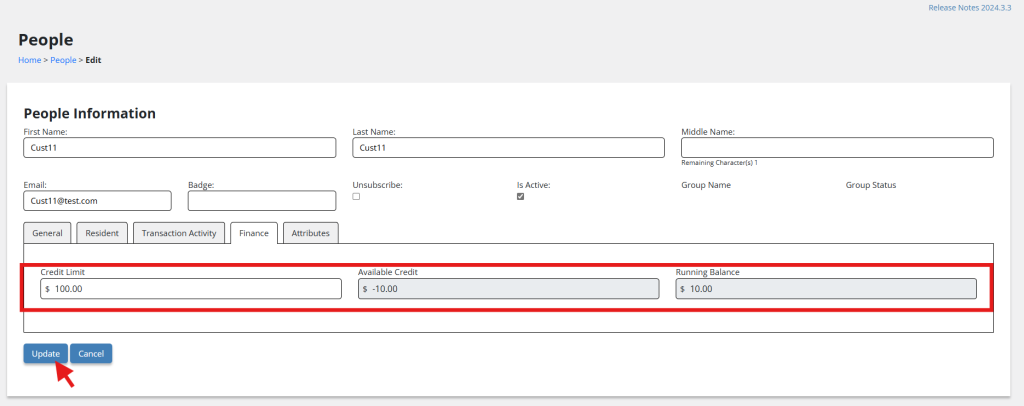
Version: 2025.1.1 introduces the new Credit Limit feature under People Info > Finance, designed to help you manage customer accounts more effectively.
- Credit Limit: Set and customize credit limits for individual customers to control spending.
- Available Credit: Monitor the remaining credit available for each customer in real time.
- Running Balance: Track the current balance to ensure customers stay within their credit limits.
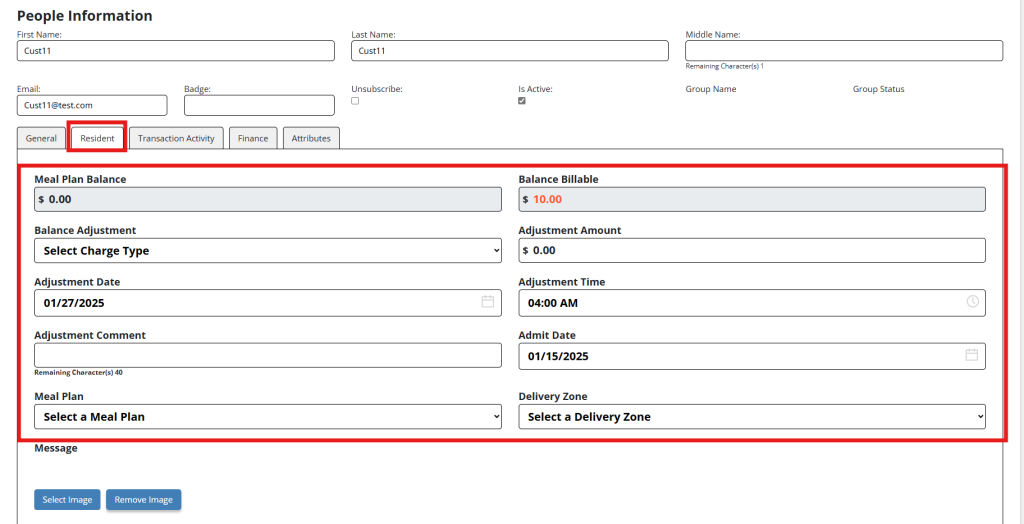
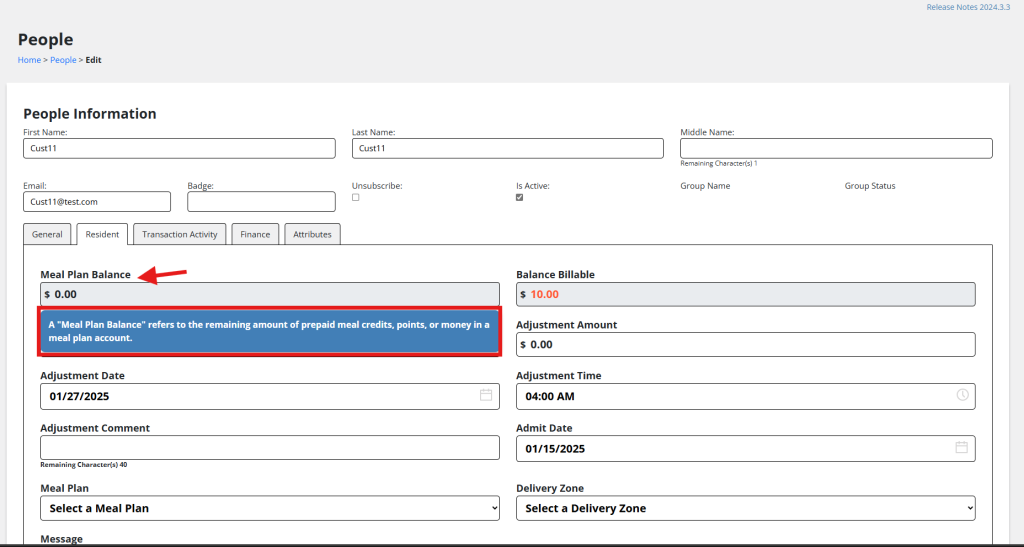
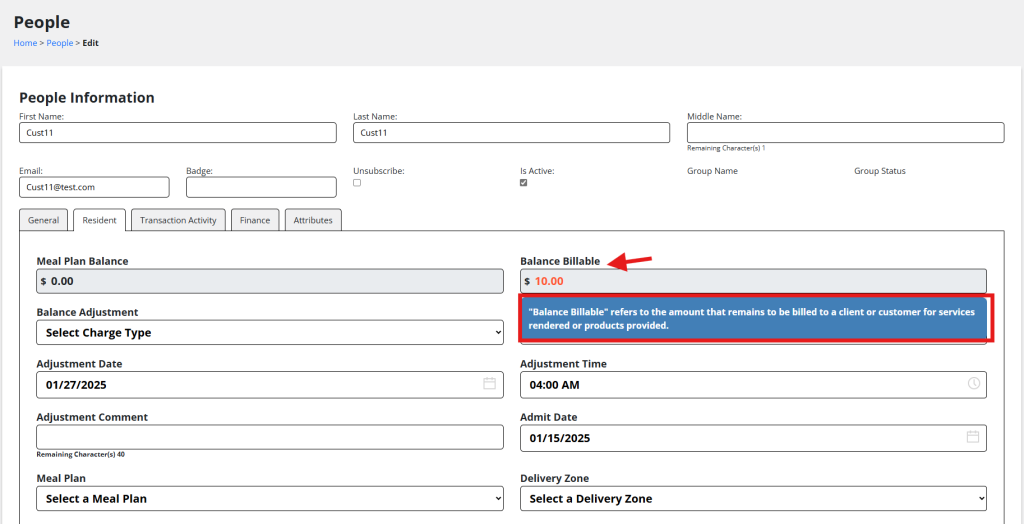
New Feature: Highlight Account Balances and Meal Counts on People Info Page
Version: 2025.1.1 introduces clear labels for easy access to sections under People Info > Resident tab, ensuring quick navigation. Hovering over each function displays a definition for better understanding.
New Update: Enhancements to Manual Adjustments in SIC
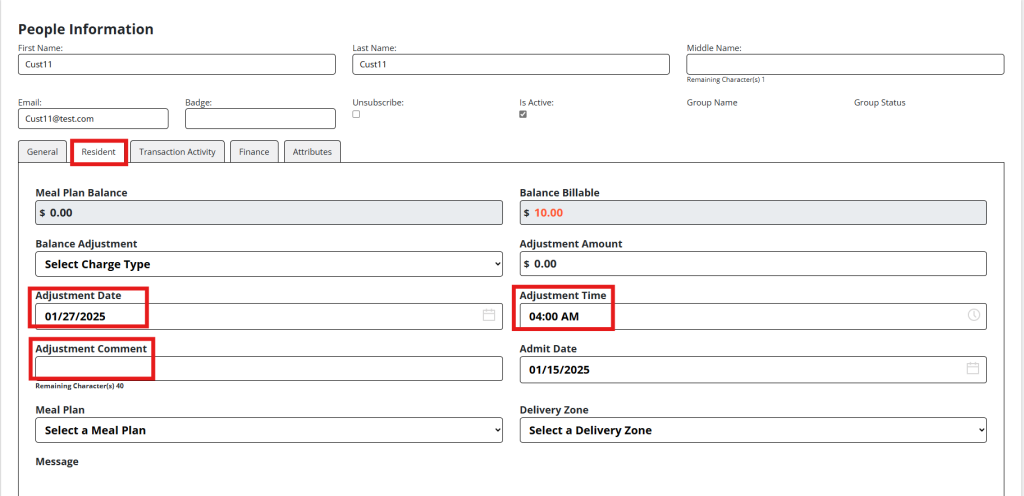
Version: 2025.1.1 introduces new functions under People Info > Resident tab, including Adjustment Date, Adjustment Time, and Adjustment Comment, allowing users to manually adjust entries for better accuracy and control.
- Adjustment Date: The date when the adjustment was made.
- Adjustment Time: The time the adjustment was processed.
- Adjustment Comment: A field to provide additional notes or details regarding the adjustment.
New Update: Functionality for Employee’s Permissions
Version: 2025.1.1 introduces a new feature under People Info > Setup Permissions. This feature allows for the management and customization of employee access and roles within the system. The available permissions include view, add, edit, and delete, providing flexibility in controlling access.
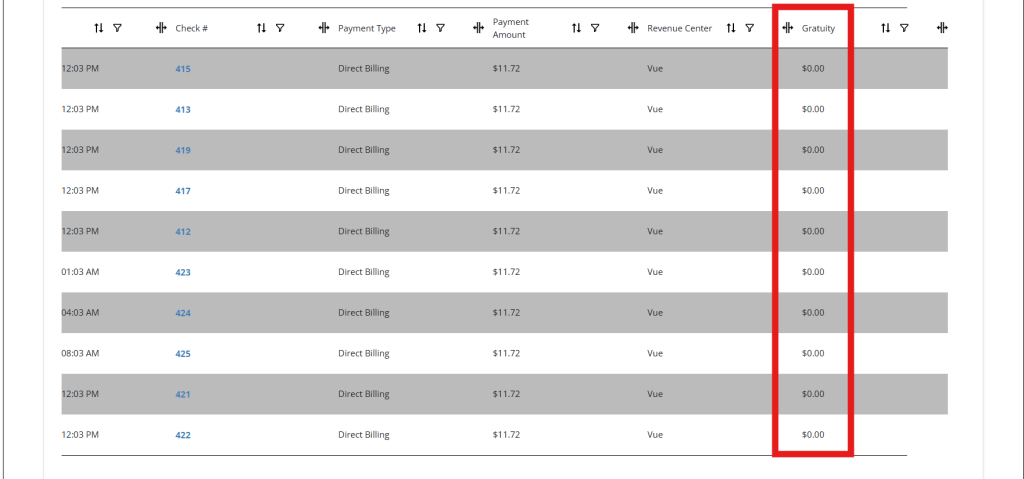
New Feature (Version 2025.1.5): Transaction Activity – Gratuity
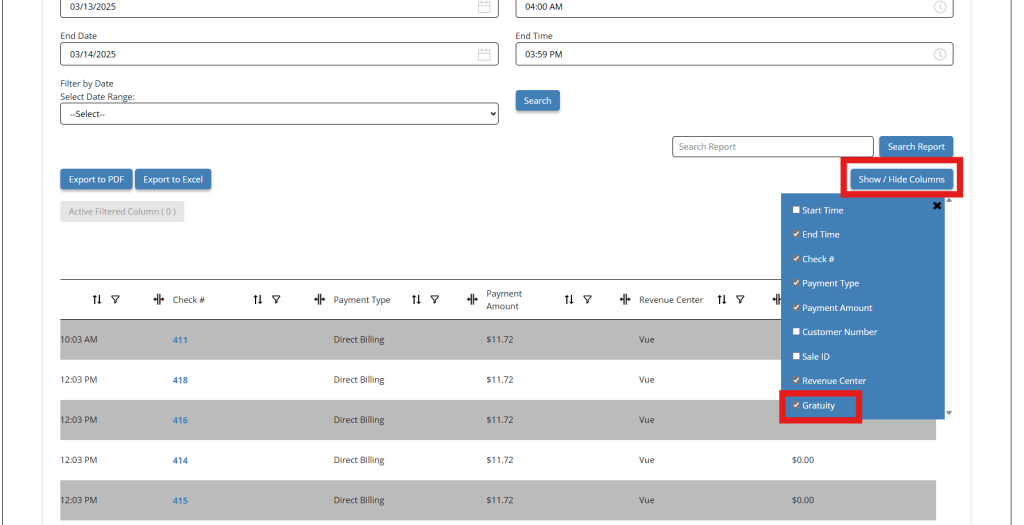
Under People Customer – Transaction Activity, the Gratuity field has been added after House Tips using the table column Sale.GratuityAmount in Show/Hide Columns and GridView.
Additionally, the Gratuity report can be exported to PDF or Excel, and the Show/Hide Columns functionality has been improved to display column options correctly without affecting the People Customer section.
Access:
Go to People Info > Transaction Activity tab to view the newly added Gratuity field.
The Gratuity filter is now available under Show/Hide Columns.
Enhancement (Version 2025.2.1): User Permissions
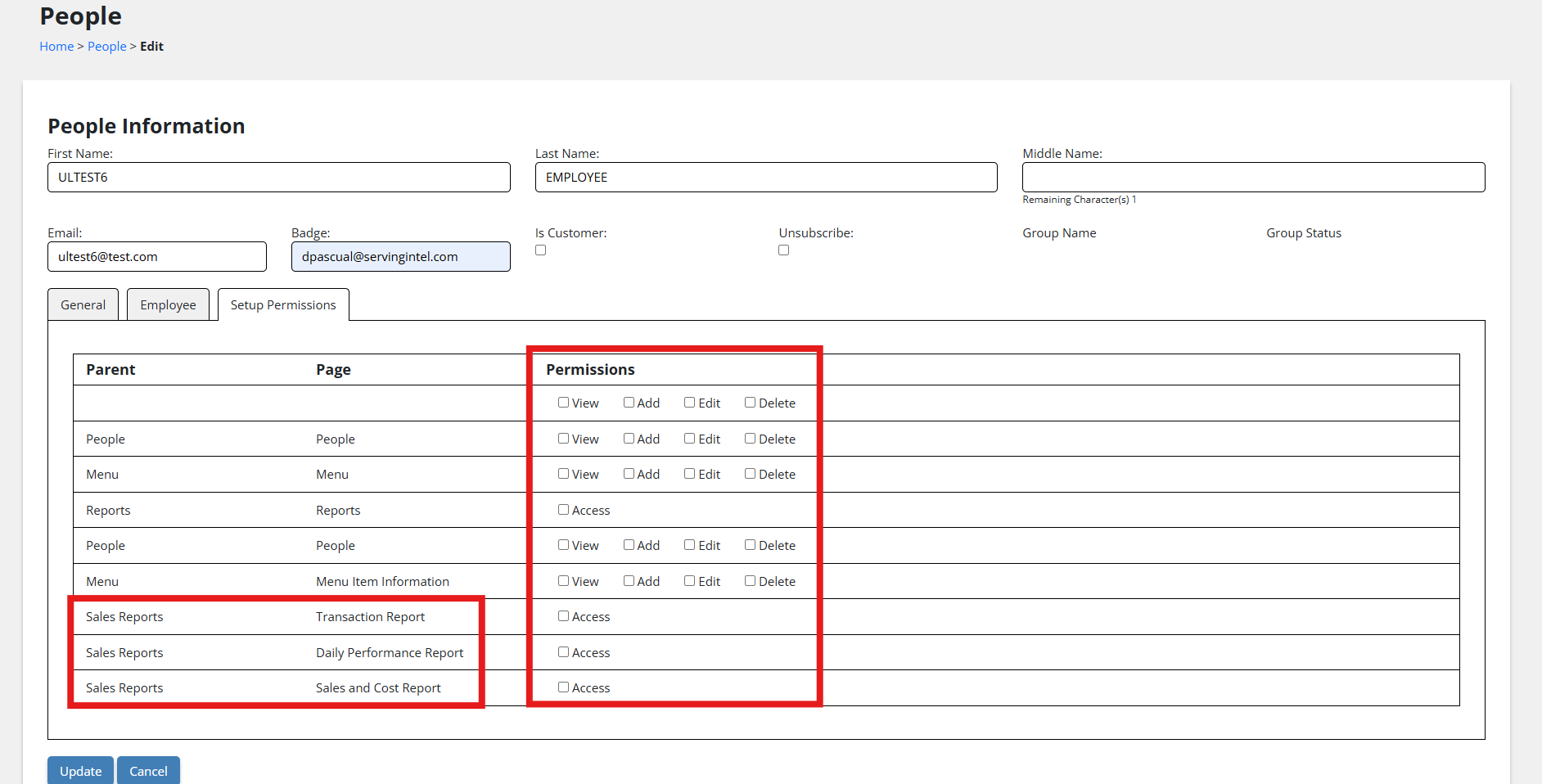
The recent update introduces improved user permission management for employee files and site managers. Permissions are now tied directly to the user profile created through the employee record, allowing for more structured and secure access control.
- Setup permissions are now restricted to Site Admins and Super Admins only.
- Report permissions have been updated to include a single “Access” checkbox for each listed report, simplifying permission management across the system.
- Enhancements ensure more consistent role-based access and improved administrative oversight.
Enhancement (Version 2025.2.4): Change ‘Job Code’ to ‘Service Profile’
This enhancement updates system terminology for improved clarity and relevance. The label ‘Job Code’ has been replaced with ‘Service Profile’ across the platform to better reflect its purpose in employee records.
- Other areas in SIC using ‘Job Code’ have also been updated to display ‘Service Profile’.
- The change is visible on the Employee tab under People > People Info > Edit Employee.

Ready to Learn More?
See how our innovative dining solutions can help elevate the resident experience and improve operational efficiencies.