
SI Cloud Control (SICC)
This guide will show how to use the ServingIntel Cloud Control platform. Run through the steps below to get started!
Overview
ServingIntel Cloud Control is a cloud-based platform that provides a complete solution for Sales Item Management, Loyalty Management and Team Member Management.
Pre-Requisites
Before using this guide, the following should be met first:
1) Any of the following roles should be granted to the user or fulfilled first before using ServingIntel Cloud Control:
a. Store Admin
b. Store User
2) Login credentials are given.
3) The following system applications and requirements are installed:
Managed by ServingIntel Cloud Control Team
This Topic Includes:
SICC Reporting
- Dashboard Reports
- Daily Performance Report
- Transaction Detail Report
- Transaction Report
- Customer Account Statements
- Gift Card Liability Report
- Item Sales Report
- Meals Sold Report
- Tip Handling Report (Tips Report)
- Time Clock Report
- Audit Report for Cancelled Sales, Voids, Comps, Discounts
- Resident Attendance Dashboard
- Resident Attendance Report
SICC Items Management
- Add Items
- Delete Items
- Update Item Images
- Update Web Item Names
- Update Items from SICC to eCommerce
- Enable/Disable Items from SICC to Hospitality Site
- Display “Available/Not Available” Items from SICC to Hospitality Site
- Update Item Availability
- Sort Items on the eCommerce Site from SICC
- Add Inscriptions for Items
- Update Item Attributes
- Set Up Item Scheduling
- Enable Meal Points
Using Group Edit Functions
Meal Plan Management
- Configuring Meal Plans
- Managing Meal Plans
- Configuring Meal Types
- Sorting Meal Types
- Meal Plan Points/Count Improvement
Site Settings Management
- Enable/Disable eCommerce
- Set Up eConnect Settings
- Set Up Order Times
- Add Item Groups
- Manage Meal Cycles
- Update Meal Cycles
- Create Meal Cycles
- Manage the Order Now Introductory Message
- Blocked Users
- Set Up Menu Names
- Add New Categories
- Delete Menu Names
- Manage eCommerce Sales Categories
- Set Up Business Hours
- Configure Settings
- Configure Devices
- Set Up a Virtual Restaurant
- Set Up Revenue Centers
- Set Up Service Profile Table Layouts
- Update Table Layouts
- Add Gift Cards
- Add Gift Card Types
- Check Security Level Settings in Discount Management and Employee Maintenance
- Enable a New Job Code
- Update POS Type on Service Profile
- Block User Sites Assignment
- Setting Up Payment Types
- Store ID Integration
- Merging User Logins & Employee
- Security Levels for 360
- 360 Devices and Printer Settings
- Delivery Zone Set Up
- Discount Management
- Add Order Type
- New Company Details
- Add eConnect Price
- Auto Gratuity – Additional Changes
- SI 360 Menu Controls
AI, BI, and SI Integration
Daily Performance Report
Managed by ServingIntel Cloud Control Team
#strategic
Date Published: May 06, 2022
Date Updated: October 08, 2025
Version: 2025.3.6
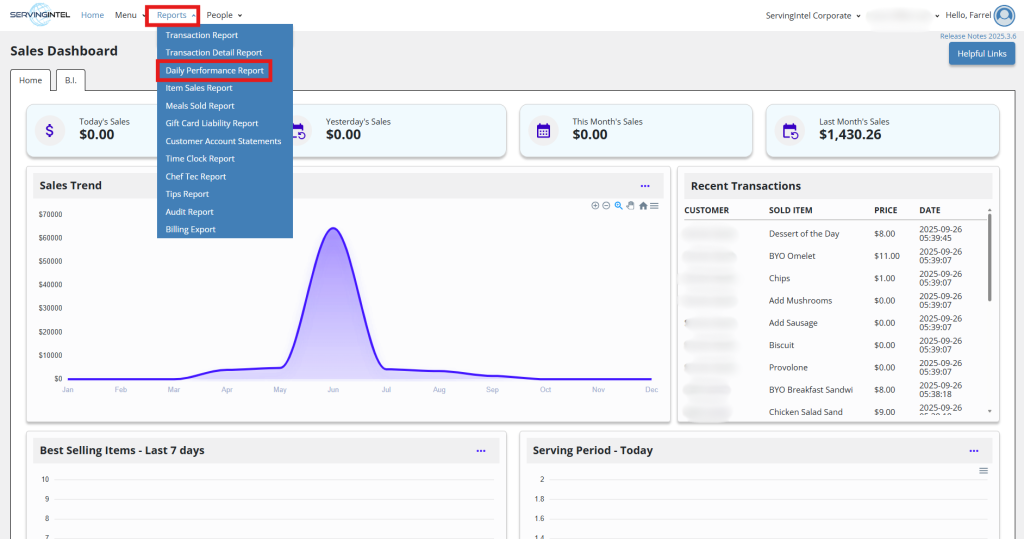
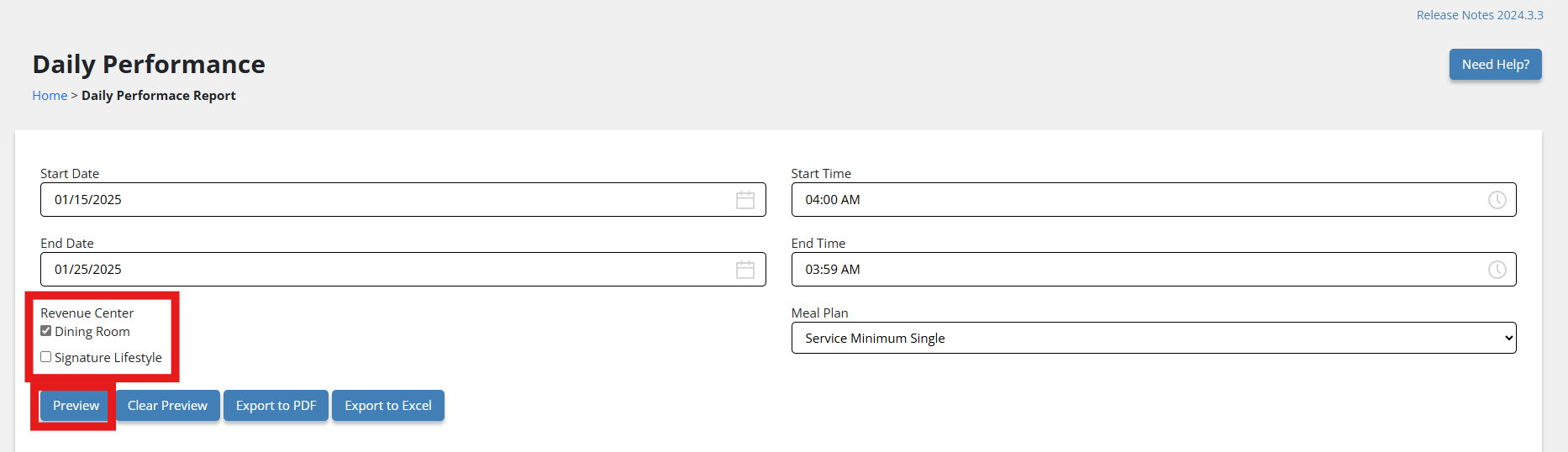
1. On the menu bar, navigate to Reports > Daily Performance Report.
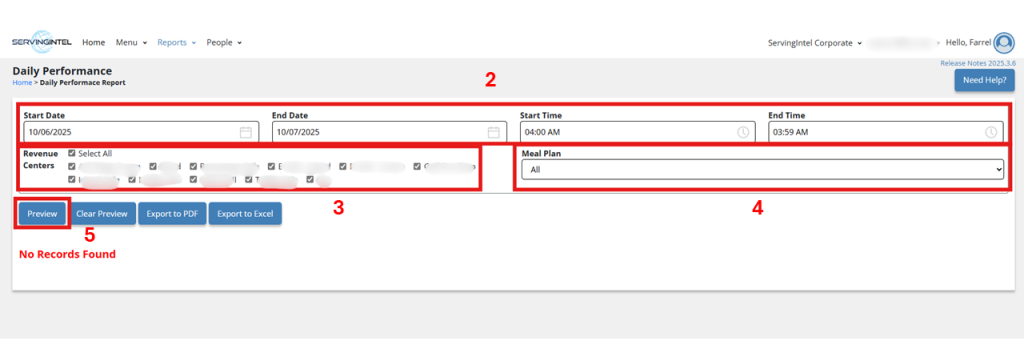
- Enter the Start and End Date, along with the Start and End Time.
- Choose a Revenue Center.
- Select the Meal Plan type.
- Click Preview.
From here, you can:
- Export the file as a PDF by clicking Export to PDF.
- Export the file as an Excel document by clicking Export to Excel.
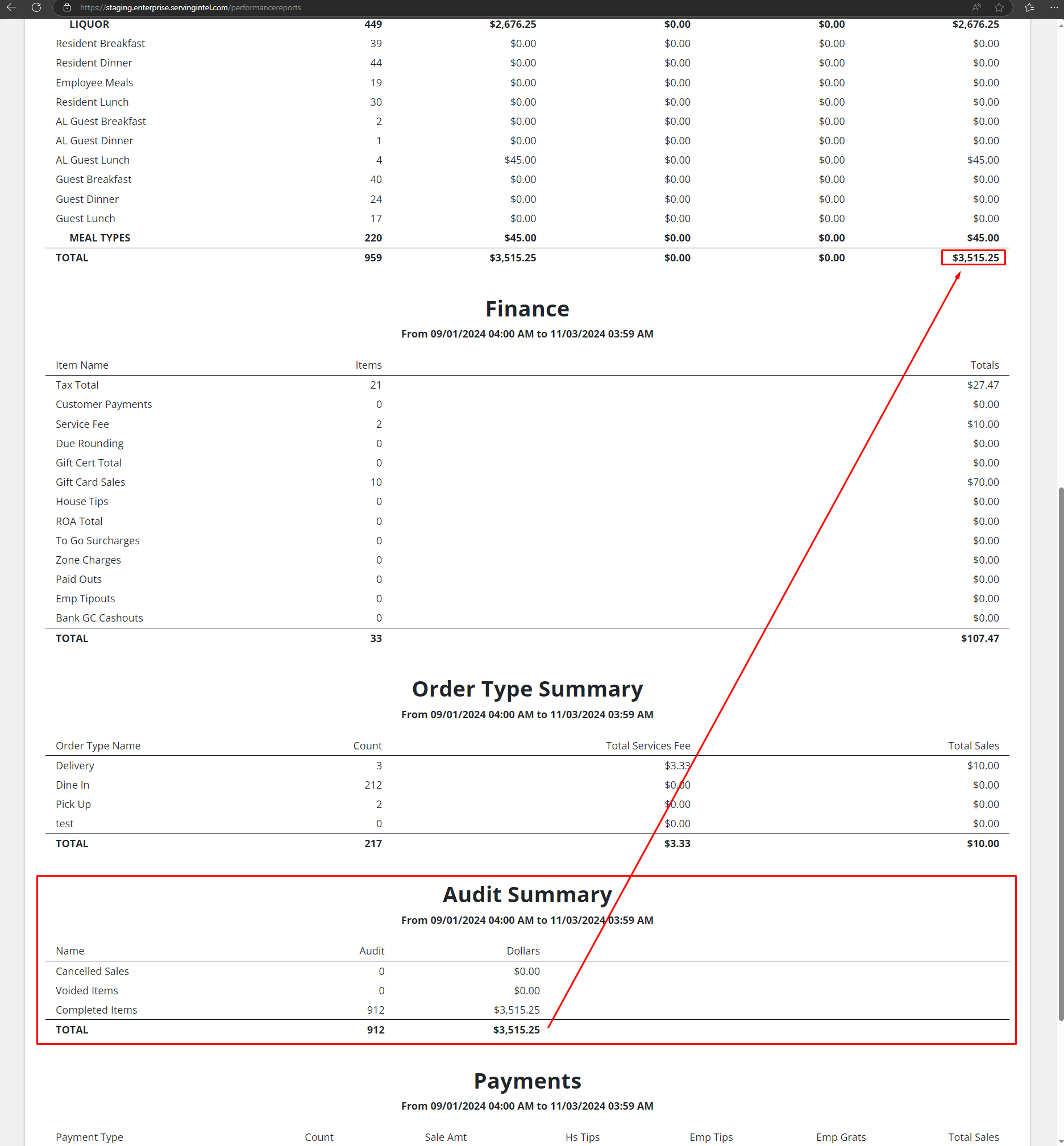
Enhancement: Audit Summary

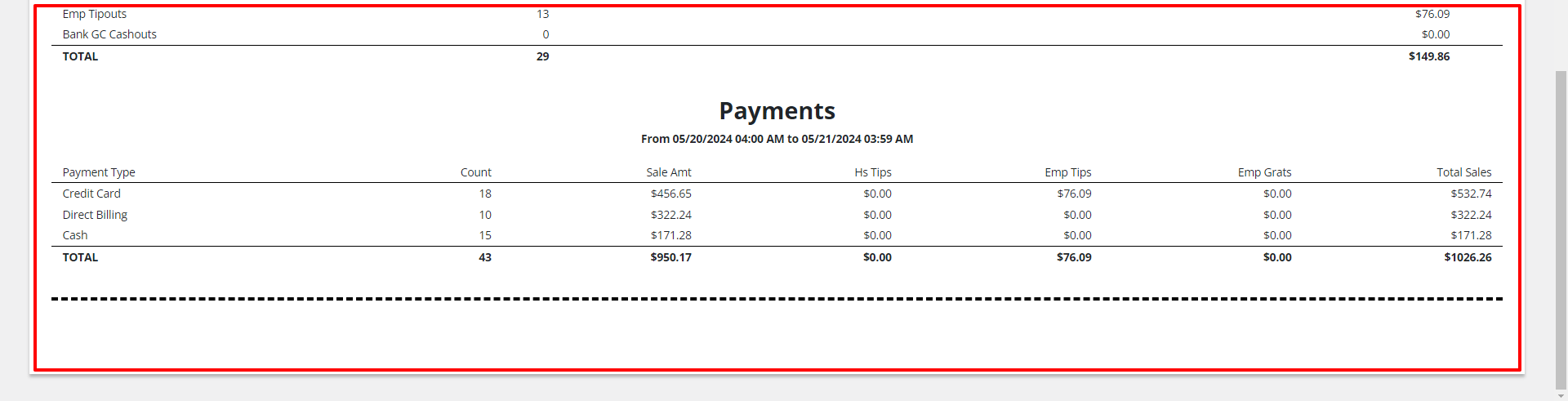
With the new update, you can now access the Audit Summary, which includes a detailed list of key activities from that day. This summary highlights:
- Cancelled Sales: Transactions that were cancelled after initiation.
- Voided Items: Items that were removed from a sale before finalizing.
- Comped Items: Items provided at no charge.
Only these activities—cancelled sales, voided items, and comped items—are included in the audit for easier tracking.
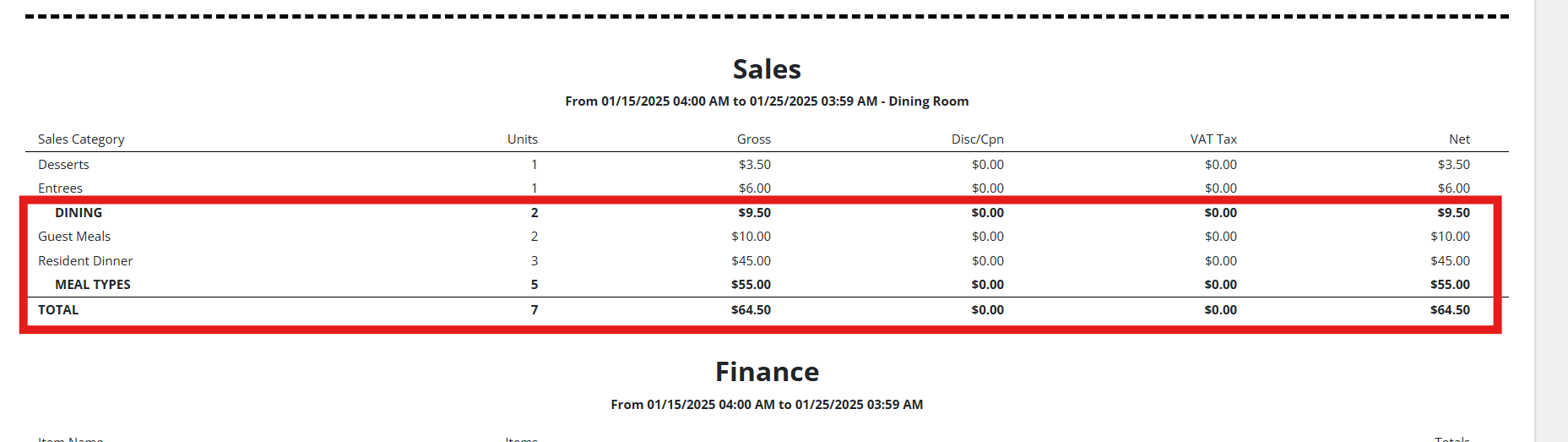
New Feature: Filter by Defined Meal Plan
With Version 2025.1.1, a new filter has been added to the daily performance report, allowing you to filter by defined meal plan.
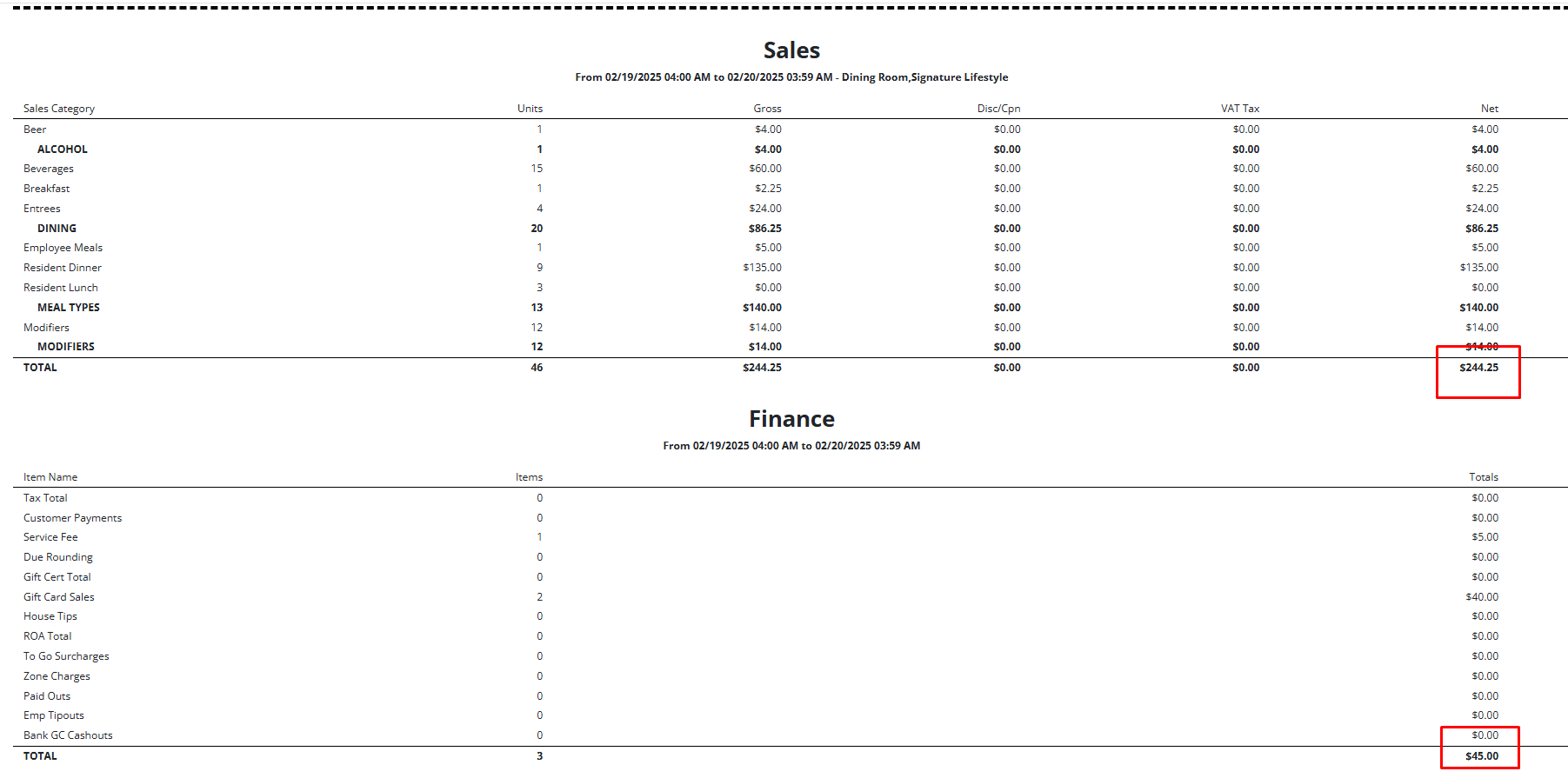
New Feature: DPR Payments – Finance
Version: 2025.1.5 introduces DPR Payments – Finance under Reports > Daily Performance Report. This update enhances financial tracking by adding the Finance Amt under the existing Sale Amt column, providing a clearer overview of transactions.
Steps to Access:
- Go to Reports > Daily Performance Report.
- View the updated report, where the Finance Amt is now included under the Sale Amt column.

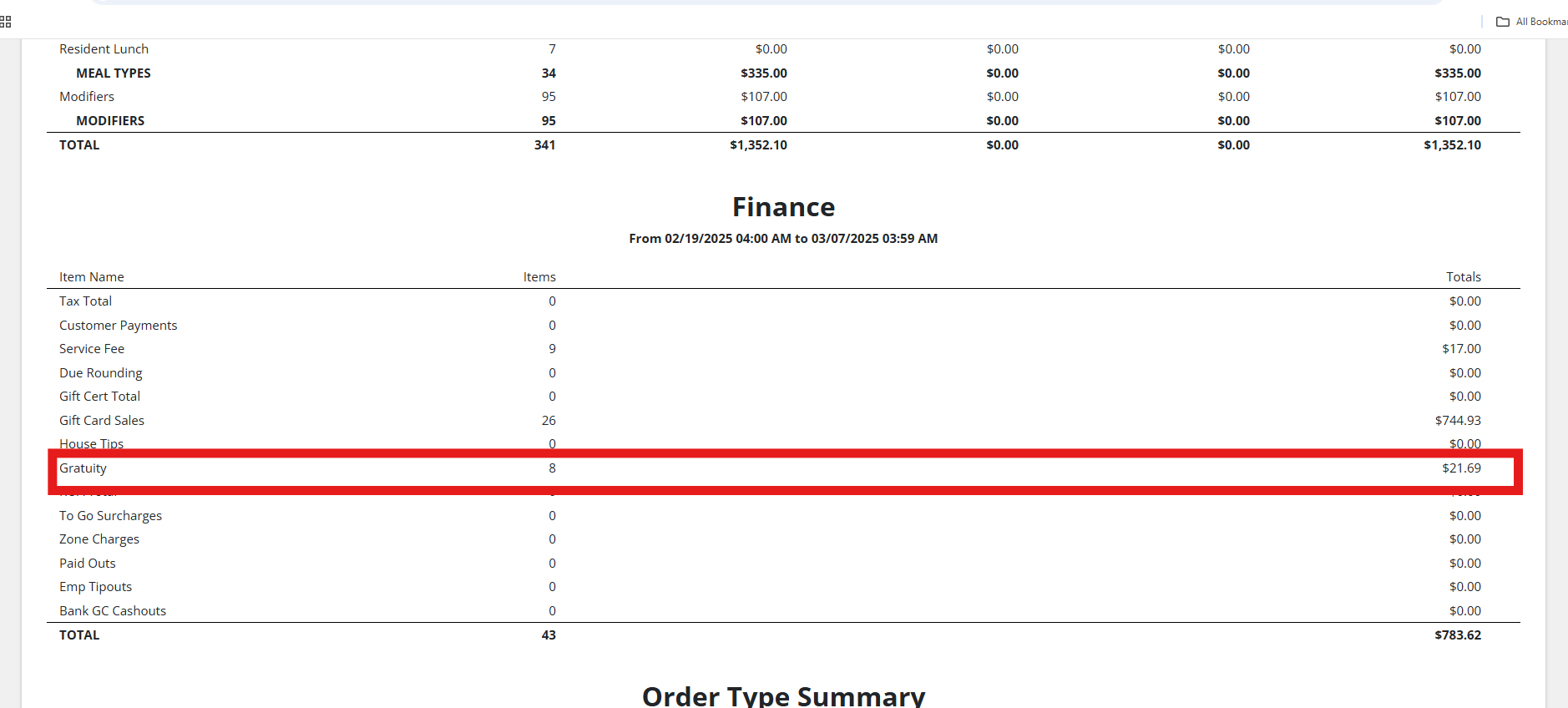
New Feature (Version 2025.1.5): Daily Performance Report – Gratuity
Under the Daily Performance Report, the Gratuity field has been added to the Finance section after House Tips using the table column Sale.GratuityAmount. This update enhances financial reporting accuracy and transparency.
Access:
Go to Reports > Daily Performance Report to view the newly added Gratuity field.
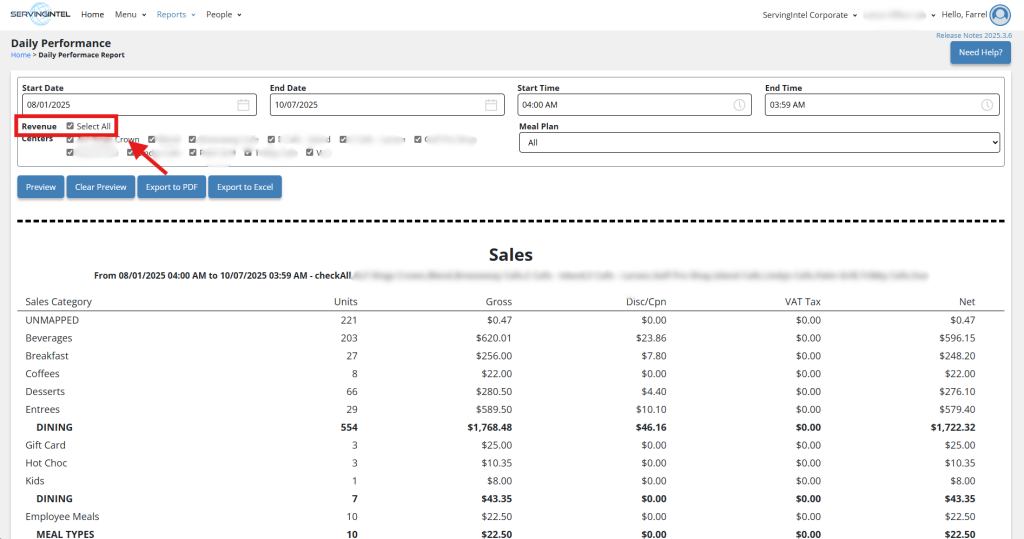
Enhancement (Version 2025.2.4): Reporting – Add Select All for All Checkboxes
This update improves report filtering by adding a Select All option for checkboxes, making it quicker and easier to manage multiple selections.

Ready to Learn More?
See how our innovative dining solutions can help elevate the resident experience and improve operational efficiencies.