
Business Office Manager
This guide outlines how to manage senior living deliverables, reporting, adding new customers, meal plans, and people information. It provides instructions for tracking deliverables, generating essential reports, managing customer data, and maintaining meal plan details to ensure efficient operations.
Overview
SI 360 is a comprehensive Point of Sale (POS) solution designed to streamline the customer experience. It allows users to book seats, place orders, manage takeout, and process payments with ease. The system simplifies operations, making it ideal for efficient service in hospitality settings.
Managed by ServingIntel 360 Team
This Topic Includes:
People information
Meal Plan
New Customer
Senior Living Deliverables
Different Branch Locations
Managed by ServingIntel Cloud Control Team
#strategic
Date Published: September 11, 2020
Date Updated: June 26, 2025
Version: 2025.2.5
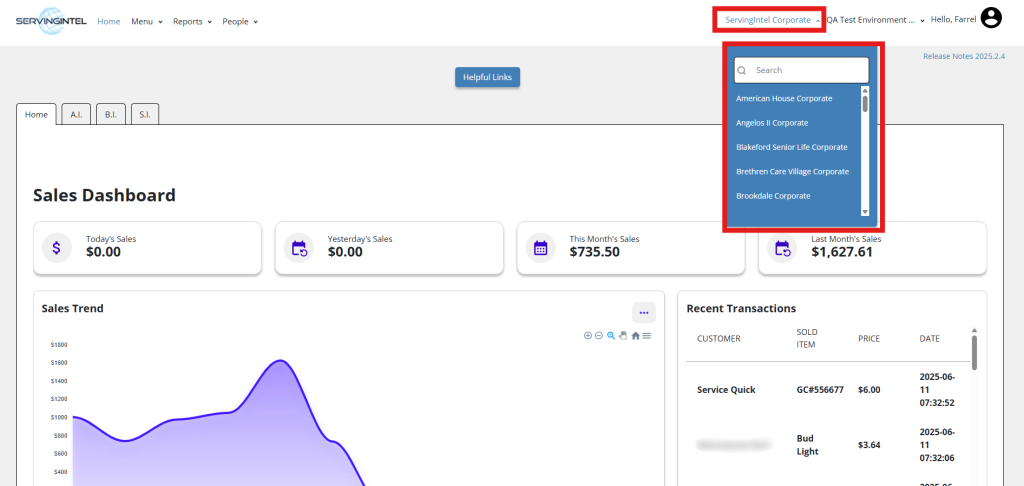
1. Upon logging in, the Dashboard will be presented, featuring the default store or restaurant associated with the user.
Please take note of the following:
- The Dashboard will exclusively display information for one store or restaurant.
- If the user is linked to multiple branches within the same store, only one Dashboard will be visible at any given time.
2. To access the Dashboard for a different branch linked to the user, simply click on the store dropdown list located in the upper right corner.

Ready to Learn More?
See how our innovative dining solutions can help elevate the resident experience and improve operational efficiencies.