

SI eConnect
This guide will show how to use the SI eConnect platform when paying for Hospitality sites during dine in or take out.
Overview
ServingIntel eConnect is a cloud-based platform that provides a complete solution for Sales Item Management, Loyalty Management and Team Member Management.
Pre-Requisites
Before using this guide, the following should be met first:
1) Any of the following roles should be granted to the user or fulfilled first before using ServingIntel Cloud Control:
a. Store Admin
b. Store User
2) Login credentials are given.
3) The following system applications and requirements are installed:
Managed by ServingIntel DBM Team
This Topic Includes:
How To Setup
IIS (Internet Information Services).
#strategic
Managed by ServingIntel Cloud Control Team
Date Published: July 18, 2024
Date Updated: July 18, 2024
Version: 2.0
1. Ensure that you’re logged in to the PC as an admin.
2. Open the Control Panel. Go to “Programs and Features.” Then, select “Turn Windows features on or off.”
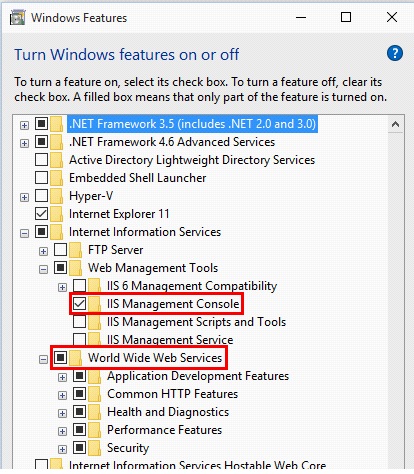
3. Within the Windows Features window, locate “Internet Information Services (IIS).”
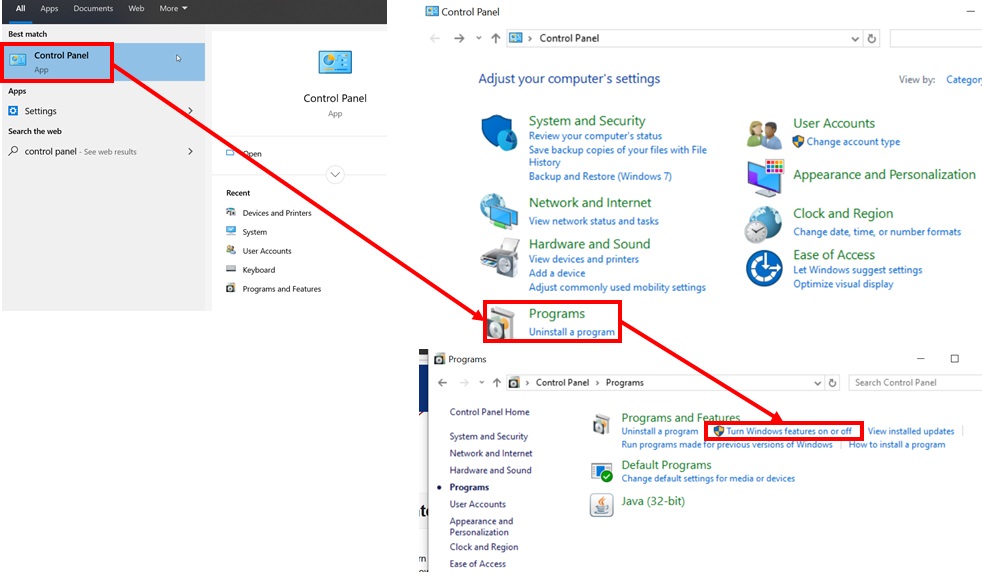
4. Check the boxes next to the components or features of IIS that you want to enable. These components might include things like Web Management Tools, World Wide Web Services, FTP Server, etc.
5. Click “OK” to apply the changes, and then close the window.
Note:
Enabling these features allows your PC to utilize Internet Information Services (IIS) for various web-related functionalities or server capabilities.

Ready to Learn More?
See how our innovative dining solutions can help elevate the resident experience and improve operational efficiencies.