

SI eConnect
This guide will show how to use the SI eConnect platform when paying for Hospitality sites during dine in or take out.
Overview
ServingIntel eConnect is a cloud-based platform that provides a complete solution for Sales Item Management, Loyalty Management and Team Member Management.
Pre-Requisites
Before using this guide, the following should be met first:
1) Any of the following roles should be granted to the user or fulfilled first before using ServingIntel Cloud Control:
a. Store Admin
b. Store User
2) Login credentials are given.
3) The following system applications and requirements are installed:
Managed by ServingIntel DBM Team
This Topic Includes:
How To Setup
Test The API Endpoint
#strategic
Managed by ServingIntel Cloud Control Team
Date Published: July 18, 2024
Date Updated: July 18, 2024
Version: 2.0
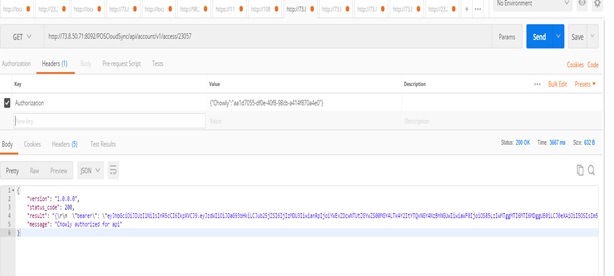
1. Access the authentication endpoint at: http://localhost/POSCloudSync/api/account/v1/access/33806
2. Utilize the POSTMAN tool to make a call to the authentication endpoint with the following Authorization header: {“Chowly”:”d0d7a8a7-d345-4cdb-8753-55e889f70940″}
3. Confirm that the response message indicates a successful outcome.

Ready to Learn More?
See how our innovative dining solutions can help elevate the resident experience and improve operational efficiencies.